
Codebase: DevEx Survey Questions to Help Teams Find, Understand, and Change Code

Codebase: DevEx Survey Questions to Help Teams Find, Understand, and Change Code
In our DevEx AI tool, we use two sets of survey questions: DevEx Pulse (one question per area to track overall delivery performance) and DevEx Deep Dive (a focused root-cause diagnostic when something needs attention).
DevEx Pulse tells us where friction is. DevEx Deep Dive tells us why it exists.
Let’s take a closer look at Codebase experience. If the Pulse question “The codebase is easy to understand and modify.” receives low scores and developers’ comments reveal significant friction and blockers, what should you do next?
Here are 13 deep dive questions you can ask your developers to uncover the causes of friction in codebase experience, along with guidance on how to interpret the results, common patterns engineering teams encounter, and practical first steps for improvement. This will help you pinpoint what’s causing the problem and fix it on your own, or move faster with our DevEx AI tool and expert guidance.
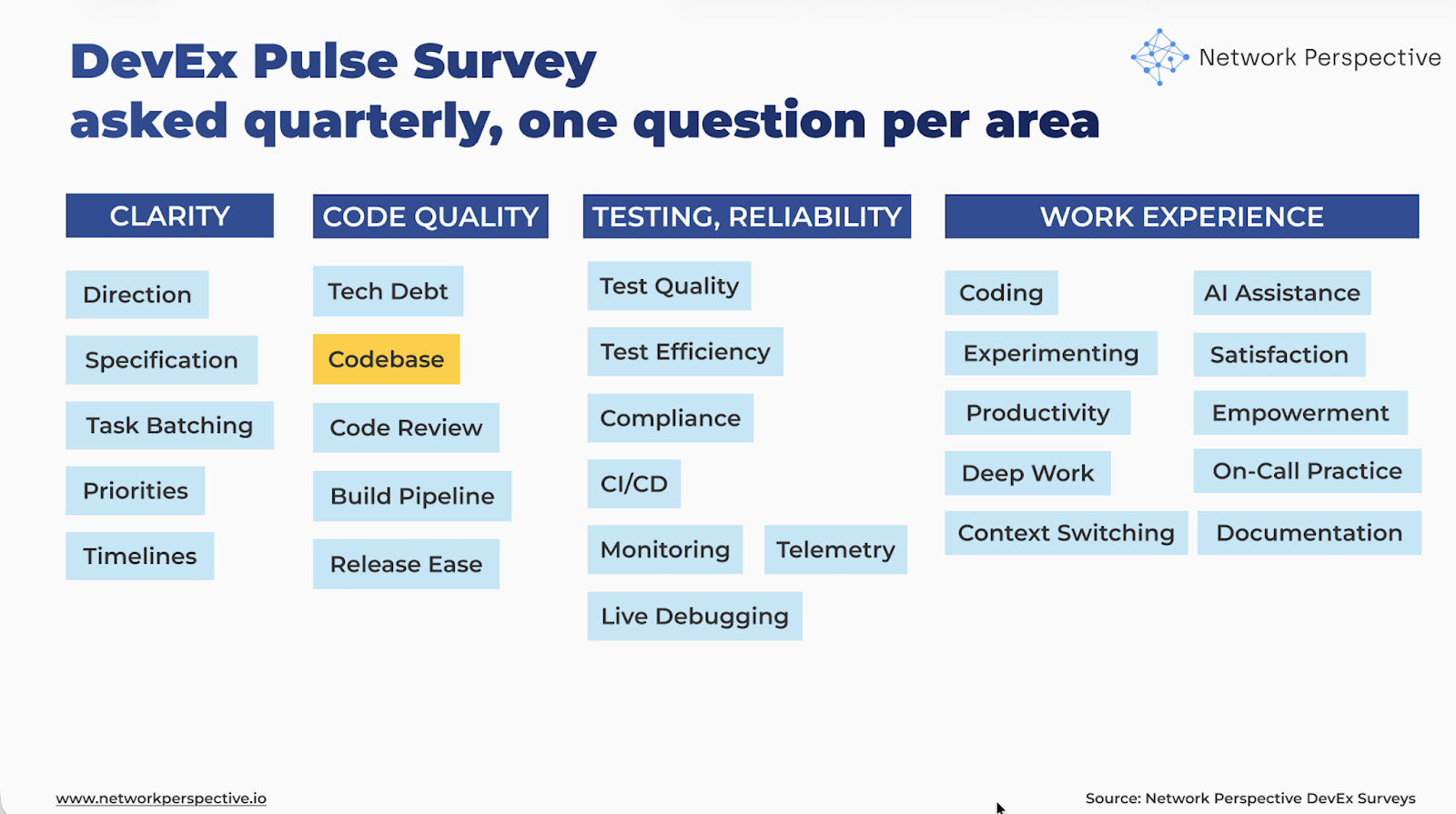
Codebase — DevEx Survey Questions for Engineering Teams
The real question is: Is the code easy to find, understand, and change with confidence — or does it quietly slow work down?
Deep dive questions should help you map how code review flows through your delivery process and identify where it breaks down:
Finding → Understanding → Layout → Change → Knowledge → History → Effort
Here’s how the DevEx AI tool helps uncover this.
Understanding
Is it easy to understand what the code does?
- Readable / Most code is easy to read and understand.
- Purpose / It’s usually clear what a piece of code is meant to do.
Layout
Is the code built in a predictable way?
- Makes sense / Files and folders are laid out in a way that makes sense.
- Same way / Similar things are built in similar ways across the code.
Finding
Is code easy to find?
- Easy find / The right code can usually be found without much searching.
- Expected place / Code usually lives where it’s expected to be.
Change
Are changes contained and safe?
- Local / Small changes usually don’t require touching many other parts of the code.
- Safe / Changes can usually be made without unexpected breakage.
Knowledge
Is understanding shared?
- Who knows / It’s clear who to ask when something in the code isn’t clear.
- Shared / More than one person understands most parts of the code.
History
Is the code friendly over time?
- New people / New team members can start working in the code without a lot of help.
- After a break / Code is easy to understand even after not working on it for a while.
Effort
- Weekly / Thinking about reading code, finding the right place to change it, and making changes safely, about how much time is spent in a typical week dealing with this?
- None
- Less than 1 hour
- 1–2 hours
- 3–5 hours
- 6–10 hours
- More than 10 hours
How to Analyze DevEx Survey Results on Codebase?
Is the code easy to find, understand, and change with confidence — or does it quietly slow work down?
Here’s how the DevEx AI tool helps make sense of the results.
How to Read Each Section
Understanding
Questions
- Readable – Most code is easy to read and understand
- Purpose – It’s usually clear what a piece of code is meant to do
What this section tests
Whether developers can quickly understand what code does, without guessing or deep digging.
How to read scores
- Readable ↓, Purpose ↓
→ Code is hard to follow and unclear in intent. - Readable ↑, Purpose ↓
→ Code looks fine, but why it exists isn’t clear. - Readable ↓, Purpose ↑
→ Intent is known, but the code itself is hard to read.
Key insight
When code purpose isn’t clear, every change takes longer.
How to read responses
- “Hard to tell what this does” → unclear intent
- “Lots of guessing” → missing clarity
- Concrete examples → strong signal
Key insight
Confusion about purpose is an early warning sign of code decay.
Layout
Questions
- Makes sense – Files and folders are laid out in a way that makes sense
- Same way – Similar things are built in similar ways across the code
What this section tests
Whether the codebase has a predictable shape, not just working code.
How to read scores
- Makes sense ↓, Same way ↓
→ The code feels messy and inconsistent. - Makes sense ↑, Same way ↓
→ Local order exists, but patterns don’t carry across the codebase. - Makes sense ↓, Same way ↑
→ Patterns exist, but they’re hard to see or follow.
Key insight
Predictable layout reduces mental load before any code is changed.
Open-ended comments
How to read responses
- “Every area is different” → inconsistency
- “Hard to know where things live” → layout issue
- “Depends who wrote it” → missing shared patterns
Key insight
Inconsistent layout turns navigation into work.
Finding
Questions
- Easy find – The right code can usually be found without much searching
- Expected place – Code usually lives where it’s expected to be
What this section tests
How much time is lost just looking for code.
How to read scores
- Easy find ↓, Expected place ↓
→ Developers spend time searching instead of building. - Easy find ↑, Expected place ↓
→ People rely on experience or tribal knowledge. - Easy find ↓, Expected place ↑
→ Structure exists, but isn’t discoverable.
Key insight
Code that can’t be found easily can’t be changed safely.
Open-ended comments
How to read responses
- “Search everywhere” → poor discoverability
- “Need to ask around” → knowledge dependency
- “Takes a while to find” → navigation tax
Key insight
Searching time is invisible work that adds up quickly.
Change
Questions
- Local – Small changes usually don’t require touching many other parts
- Safe – Changes can usually be made without unexpected breakage
What this section tests
Whether changes are contained and predictable, or risky and wide-reaching.
How to read scores
- Local ↓, Safe ↓
→ Code is tightly coupled and fragile. - Local ↑, Safe ↓
→ Changes are small, but still feel risky. - Local ↓, Safe ↑
→ Teams move carefully to stay safe.
Key insight
Fear of breaking things is a sign the codebase isn’t under control.
Open-ended comments
How to read responses
- “Touch one thing, break another” → coupling
- “Needs lots of checking” → low safety
- “Avoid certain areas” → fragile code
Key insight
Safe change is the core of a healthy codebase.
Knowledge
Questions
- Who knows – It’s clear who to ask when something isn’t clear
- Shared – More than one person understands most parts of the code
What this section tests
Whether understanding is shared across the team, or stuck with a few people.
How to read scores
- Who knows ↓, Shared ↓
→ Knowledge silos and single points of failure. - Who knows ↑, Shared ↓
→ Owners exist, but understanding isn’t spread. - Who knows ↓, Shared ↑
→ Knowledge exists, but ownership is fuzzy.
Key insight
Code understood by only a few people slows everyone else.
Open-ended comments
How to read responses
- “Only one person knows this” → bus factor risk
- “Need permission to touch” → dependency
- “Hard to get help” → knowledge gap
Key insight
Shared understanding is a force multiplier.
History
Questions
- New people – New team members can start working in the code without a lot of help
- After a break – Code is easy to understand even after time away
What this section tests
Whether the codebase is friendly over time, not just to current experts.
How to read scores
- New people ↓, After a break ↓
→ Code only works for insiders. - New people ↑, After a break ↓
→ Onboarding works, long-term clarity doesn’t. - New people ↓, After a break ↑
→ Experts cope, newcomers struggle.
Key insight
Code should explain itself over time, not rely on memory.
Open-ended comments
How to read responses
- “Hard to ramp up” → steep learning curve
- “Lots of hand-holding” → poor onboarding
- “Forget quickly” → unclear structure
Key insight
A codebase that forgets itself creates drag.
Effort
Question
- Weekly – Time spent reading code, finding the right place to change it, and making changes safely
How to read responses
- 0–1 hr/week → Healthy codebase
- 1–3 hrs/week → Noticeable friction
- 3–5 hrs/week → Systemic drag
- 6+ hrs/week → Must-fix problem
Key insight
Time spent just understanding and changing code is the clearest cost signal.
Pattern Reading (Across Sections)
Pattern — “Hard to Navigate” (Common)
Pattern: Layout ↓ + Finding ↓
Interpretation - time is lost before work even starts.
Pattern — “Fearful Changes” (Common)
Pattern: Change ↓ + Effort ↑
Interpretation - risk slows delivery more than complexity.
Pattern — “Knowledge Bottleneck” (Very common)
Pattern: Knowledge ↓ + New people ↓
Interpretation - a few people carry the whole system.
Pattern — “Short-Term Friendly” (Medium)
Pattern: Understanding ↑ + History ↓
Interpretation - code works now but doesn’t age well.
How to Read Contradictions (This Is Where Insight Is)
Contradiction Readable ↑, Easy find ↓
Code is clear but buried.
Contradiction Local ↑, Safe ↓
Changes are small but still risky.
Contradiction Who knows ↑, Shared ↓
Ownership without knowledge spread.
Contradiction New people ↑, After a break ↓
Onboarding scripts hide deeper issues.
Contradictions show where the system works locally but fails globally.
Final Guidance — How to Present Results
What NOT to say
- “The codebase is bad”
- “We need a big refactor”
- “Developers don’t understand the code”
What TO say (use this framing)
“This shows where our code makes everyday work harder than it needs to be.”
“The issue isn’t skill — it’s layout, shared knowledge, and change safety.”
One Powerful Way to Present Results
Show three things only:
- How easy code is to find
- How safe changes feel
- How many hours per week this costs
Using DevEx Codebase Insights to Improve How Teams Find, Understand, and Change Code
Here’s how the DevEx AI tool will guide you toward making first actions.
First Steps Per Section
Understanding
Signal: Code is readable but unclear in purpose, or both are weak.
First steps
- Add one short purpose comment at the top of key modules or services explaining: what this code is responsible for, and what problem it solves
- Encourage commit messages that explain “why this exists”, not just what changed.
Small operational change - add a simple practice: Every major file or module answers: “What does this code exist to do?”
Layout
Signal: Code structure varies across areas of the system.
First steps
- Define 2–3 structural conventions for common patterns (API, service, job, handler, etc.).
- Document one example per pattern instead of writing heavy documentation.
- Encourage teams to align new code with existing patterns.
Small operational change - create a “reference folder” or example component showing how things should be structured.
Finding
Signal: Developers spend time searching for the right code.
First steps
- Create a short system map explaining: main components, and where major logic lives
- Add README files at the top of key directories explaining what lives there.
Small operational change - introduce a rule: Every major folder has a short README explaining what lives there.
Change
Signal: Small changes touch many areas or feel risky.
First steps
- Identify areas where small changes cascade across the system.
- Introduce clear boundaries between modules or services.
- Encourage developers to add tests around fragile areas before modifying them.
Small operational change - adopt a habit: When touching fragile code, add a small safety test first.
Knowledge
Signal: A few people carry most of the understanding.
First steps
- Encourage pair changes in complex areas.
- Rotate code review ownership across the team.
- Run short “show the code” sessions where engineers explain key areas.
Small operational change - once per sprint: One developer explains a part of the system others rarely touch.
History
Signal: Code relies on memory instead of structure.
First steps
- Encourage lightweight architecture notes explaining: why key decisions were made, and tradeoffs taken
- Capture decision context when large changes are introduced.
Small operational change - add a simple rule: When making structural changes, record why in a short design note.
First Steps for Patterns
Pattern — “Hard to Navigate”
(Layout ↓ + Finding ↓)
First step - create a simple system map showing:
- main services or modules
- how requests flow
- where key logic lives
Even a single diagram or markdown page can dramatically reduce navigation time.
Pattern — “Fearful Changes”
(Change ↓ + Effort ↑)
First step - introduce safety around fragile areas:
- add small tests
- isolate risky code
- wrap unstable logic behind clearer interfaces.
The goal is reducing fear, not rewriting the system.
Pattern — “Knowledge Bottleneck”
(Knowledge ↓ + New people ↓)
First step - reduce single-person ownership. Practices that work well:
- rotating reviewers
- pair debugging
- “tour of the system” sessions.
Pattern — “Short-Term Friendly”
(Understanding ↑ + History ↓)
First step - capture lightweight architectural memory. Example format:
- Why this exists
- What problem it solves
- Tradeoffs made
- What might change later
This helps future developers understand decisions without asking original authors.
First Steps for Contradictions
Contradictions highlight hidden system friction.
Contradiction Readable ↑, Easy find ↓
Code is good but buried.
First step - improve discoverability, not code quality. Add:
- directory READMEs
- search keywords
- system maps.
Contradiction Local ↑, Safe ↓
Changes are small but still risky.
First step - add tests or monitoring around fragile areas before modifying them. This increases change confidence quickly.
Contradiction Who knows ↑, Shared ↓
Ownership exists but knowledge isn’t spread.
First step - encourage review and pairing outside the usual owners. Knowledge spreads through participation, not documentation.
Contradiction New people ↑, After a break ↓
Onboarding works but long-term clarity fails.
First step - improve structural clarity, not onboarding. Focus on:
- consistent layout
- purpose comments
- architecture notes.
The Core Improvement Rule
Improve how code explains itself before rewriting it. Most codebase friction comes from:
- unclear intent
- poor discoverability
- fragile boundaries
- knowledge silos
not from the code being fundamentally wrong. Small clarity improvements often reduce friction more than large refactors.
The Most Powerful First Step Overall
Create a simple “map of the system”. A lightweight document or diagram showing:
- major components
- how requests flow
- where key logic lives.
Find code faster → understand it faster → change it with confidence → reduce time lost navigating the codebase. This single step often reduces hours of invisible navigation work every week.
There’s Much More to DevEx Than Metrics
What you’ve seen here is only a small part of what the DevEx AI platform can do to improve delivery speed, quality, and ease.
If your organization struggles with fragmented metrics, unclear signals across teams, or the frustrating feeling of seeing problems without knowing what to fix, DevEx AI may be exactly what you need. Many engineering organizations operate with disconnected dashboards, conflicting interpretations of performance, and weak feedback loops — which leads to effort spent in the wrong places while real bottlenecks remain untouched.
DevEx AI brings these scattered signals into one coherent view of delivery. It focuses on the inputs that shape performance — how teams work, where friction accumulates, and what slows or accelerates progress — and translates them into clear priorities for action. You gain comparable insights across teams and tech stacks, root-cause visibility grounded in real developer experience, and guidance on where improvement efforts will have the highest impact.
At its core, DevEx AI combines targeted developer surveys with behavioral data to expose hidden friction in the delivery process. AI transforms developers’ free-text comments — often a goldmine of operational truth — into structured insights: recurring problems, root causes, and concrete actions tailored to your environment.
The platform detects patterns across teams, benchmarks results internally and against comparable organizations, and provides context-aware recommendations rather than generic best practices.
Progress on these input factors is tracked over time, enabling teams to verify that changes in ways of working are actually taking hold, while leaders maintain visibility without micromanagement. Expert guidance supports interpretation, prioritization, and the translation of insights into measurable improvements.
To understand whether these changes truly improve delivery outcomes, DevEx AI also measures DORA metrics — Deployment Frequency, Lead Time for Changes, Change Failure Rate, and Mean Time to Recovery — derived directly from repository and delivery data. These output indicators show how software performs in production and whether improvements to developer experience translate into faster, safer releases.
By combining input metrics (how work happens) with output metrics (what results are achieved), the platform creates a closed feedback loop that connects actions to outcomes, helping organizations learn what actually drives better delivery and where further improvement is needed.
Returning to our topic — codebase experience — you can explore proven practices grounded in hundreds of interviews our team has conducted with engineering leaders.

